

Overview
What it does
Support is layered, and it starts with documentation you can read without talking to anyone: the full manual and a growing library of scenarios are published here on the site. When the docs don't settle it, you can open a remote support session — a service we run — where a product-trained assistant, and a human when it's warranted, help you over a channel you open and stay in control of.
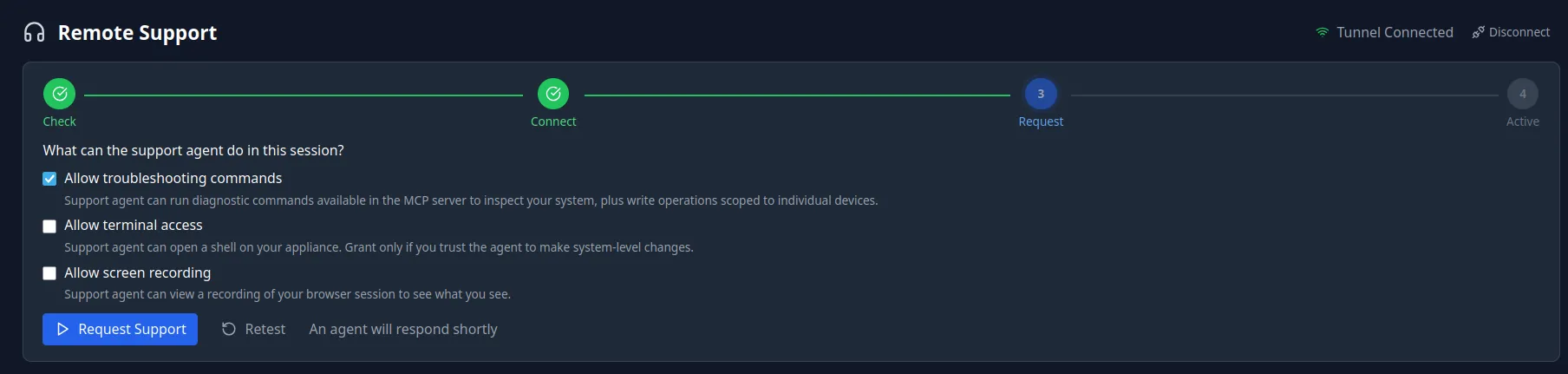
The session is where the capability lives — and it is deliberately bounded. With your consent the assistant can read the appliance's live state to answer "is it actually doing this right now," and make changes only when you explicitly approve each one. What it cannot do is open a shell: the terminal is reserved for a human, granted only as a last resort and only if you allow it. Everything that happens is recorded on your own appliance, and you can replay it in full.
Documentation
Docs first — and more for the assistant
The documentation is centralized here on the site, so the first answer to most questions is a page away — no session to open, nothing to share. The support assistant goes further: it draws on a deeper, curated library of docs and scenarios than the public set, so when you do reach out it already carries context the public pages don't.
Remote support
A product-trained assistant, when you want it
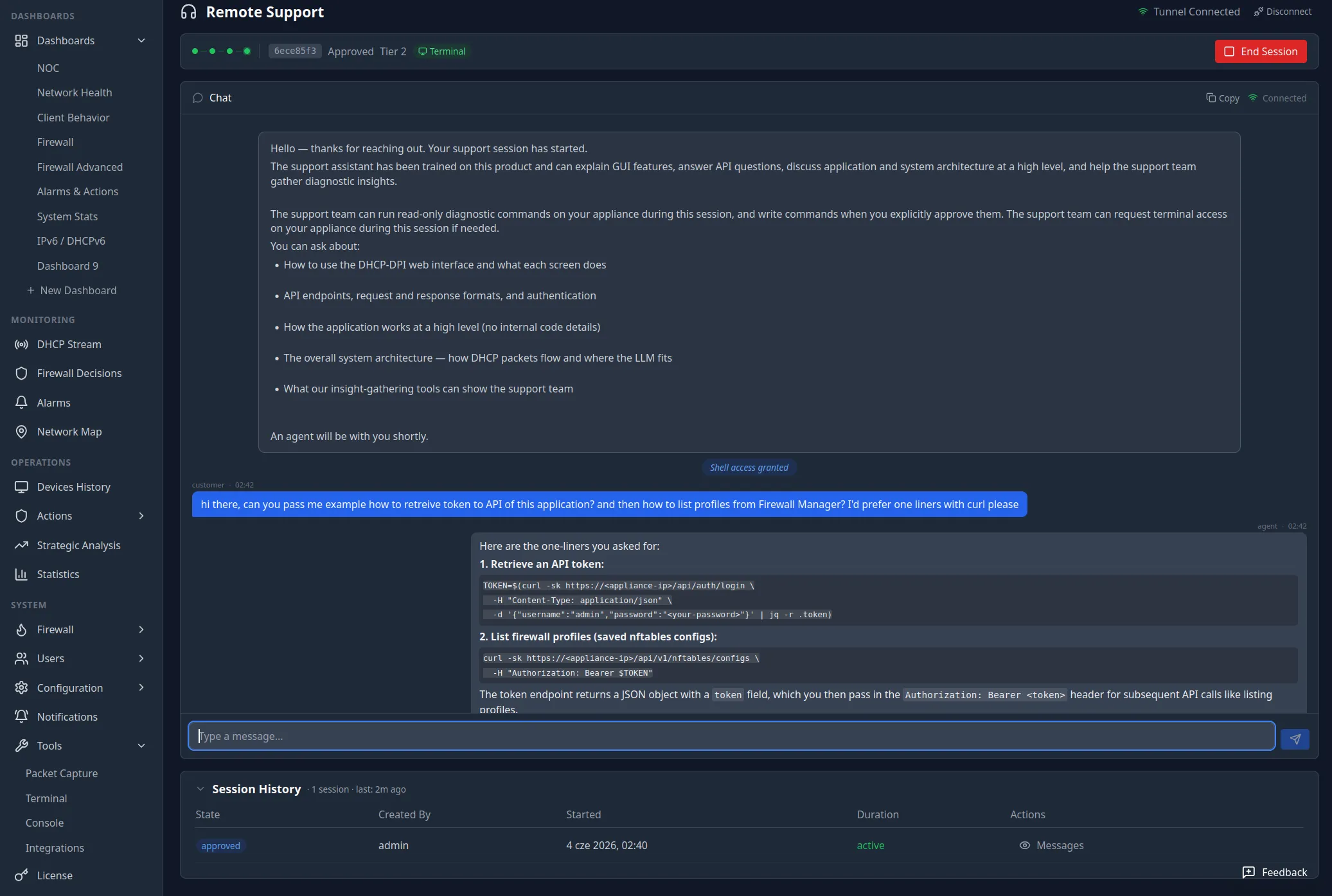
Open a session and a support assistant joins the chat. It is trained on the product and can explain any screen in the GUI, answer API and integration questions — down to working one-liners — and talk through how the system is put together at a high level. You can also ask about your own system: not just how it works, but how it is doing right now. The assistant is part of a service we operate; it is there when you open a session and gone when you end it.
Diagnostics
It can look — and, on your say-so, act
To answer questions about your live system, the assistant — or the human behind it — runs commands through the appliance's own MCP interface. Read-only diagnostics are the default; anything that changes state — a write scoped to a single device — waits for your explicit approval, shown as a plain Allow / Deny prompt in the chat. Nothing runs that you didn't agree to, and the read-versus-write split is exactly the one the MCP server enforces for every other client.
Escalation
A human — and a terminal as a last resort
When a problem outgrows what the assistant can do in chat, it escalates to a person on our team over the same session. The terminal belongs to that human, never the assistant: the AI can run MCP diagnostics on your consent, but it never holds a shell. For the rare case that genuinely needs hands on the box, a human agent can be granted terminal access — only as a last resort, only after you allow it for that session, and only once the consent prompt is answered. The default is off; you grant it deliberately, for one session, and it ends when the session does.
Accountability
Every session audited — and replayable
You don't have to take our word for what happened. Every shell session is recorded on your own appliance, and you can replay it in full — the commands that were run, their output, and any file that was edited — exactly as it played out. The record is yours: it lives on your hardware, in your audit trail, tied to the session, the agent, and the time. You can hand over a terminal and still hold the work accountable afterwards.
Remote help, entirely on consent — and replayable to the last command.
How it works
From a doc page to a replayable session
- 1
Start with the docs — the full manual and the scenario library are on this site, so most questions never need a session.
- 2
When you want more, open a remote support session. The channel is outbound and opened by you; a product-trained assistant joins the chat.
- 3
Ask about the docs, the system, or its live status. With read-only consent, the assistant runs diagnostics through the appliance's MCP interface to answer.
- 4
Any change waits for an explicit Allow / Deny in chat. When needed it escalates to a human — and only a human can take a terminal, as a last resort and only if you grant it.
- 5
Every shell session is recorded on your appliance and replayable in full: commands, output, and file edits, tied to the session, agent, and time.
Keep reading